AutoZen-Car Dashboard&Launcher
- 4.1
- Rating
- 1.00M
- Installs
- Free
- Price

 Analysis by App-foxy
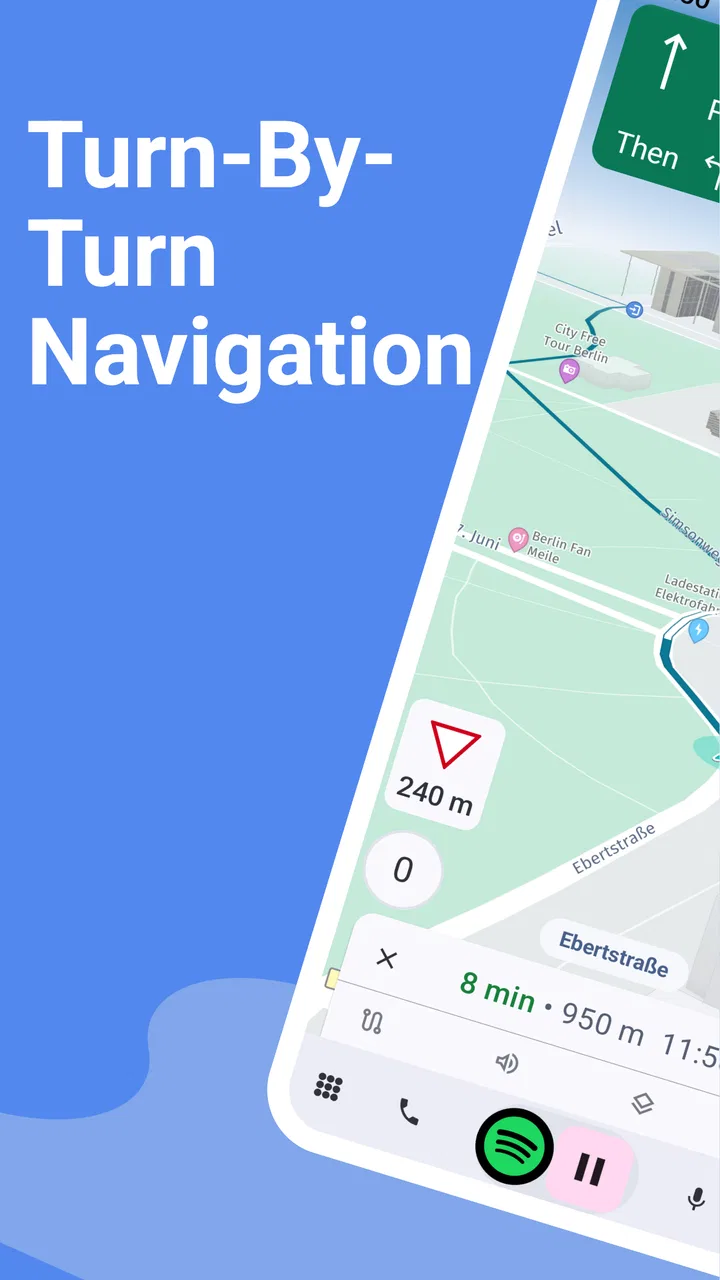
I spent time using AutoZen-Car Dashboard&Launcher as a practical driving companion rather than treating it like another app to browse casually. It is an Android app from ZenThek in the Auto & Vehicles category, built around a larger, more car-friendly interface for navigation, music, calls, and the controls I want close at hand while driving. The idea is simple: make the phone feel more like a dashboard than a pocket computer.
That focus becomes especially useful in a household where one phone, one car, or several drivers share the same routine. A family member can use the same dashboard layout for a school run, another driver can rely on it for a commute, and someone else can open it for a longer trip without having to search through ordinary phone menus. I found that shared convenience is one of its strongest practical arguments, although it also creates a few boundaries that are worth understanding before making it the default interface for everyone.
How AutoZen fits into a shared car routine
The most convincing use case is a phone mounted in the vehicle and prepared before the journey begins. Instead of unlocking the phone and moving between separate navigation, music, and phone apps, the dashboard-style presentation puts those driving tasks into one place. I liked the reduction in visual hunting, particularly when I was already focused on traffic and only needed to start a route or change audio.
You May Also Like

 Blood Strike: 2.5 Anniversary
Blood Strike’s Loadouts Turn Every Drop Into a Tactical Gamble
A close look at Blood Strike’s custom loadouts: how fast access to signature weapons reshapes its battle royale rhythm, rewards preparation, and narrows the gap between fights.

 Pandora - Music & Podcasts
Pandora’s Music Is Easy to Start, but Harder to Recover
Pandora’s strength is its low-effort path from a seed to a station. Its weak spot is how much confidence it asks you to place in connection, setup, and quiet recovery.

 8 Ball Pool
 Is Built on Rivalries, Rematches, and Routine
A close look at the rivalries, rematches, shared routines, and unanswered safety questions that turn a quick pool match into a persistent mobile community.

 Samsung Music
’s Quiet Strength Is Playing What You Already Own
Its reach comes less from spectacle than from dependable access to a personal library. That simplicity is both the app’s strongest retention engine and its ceiling.

 AccuWeather: Weather Radar
AccuWeather Review: A Quick, Clear Forecast for Everyday Decisions
For everyday plans, the best forecast is the one you can understand quickly. AccuWeather makes rain timing, radar, and local conditions easy to act on, with a few trade-offs.

 Hill Climb Racing
Why Hill Climb Racing Still Turns Crashes Into One More Run
A tiny car, a bumpy hill and one more upgrade: Hill Climb Racing keeps resurfacing because its simple chaos makes every near-miss feel personal.
More From Our News Desk



For a shared household car, that arrangement can make handovers smoother. The person leaving the house can open the dashboard, choose the destination, and start the trip without changing the phone’s entire everyday home screen. The next driver then encounters a purpose-built driving surface rather than a collection of unrelated notifications and social apps. That separation is not the same as having separate user accounts, but it is a useful behavioral boundary: the car interface is for the journey, while the normal phone interface remains for personal use.
A realistic example is a morning when one driver takes a child to school and another uses the car later for work. The first driver can use navigation and calls from the same driving-oriented screen, then leave the phone ready for the next person. The second driver does not need to learn a completely different system just to get directions. In my experience, that shared familiarity matters more than a long list of advanced options.
There is also a quieter benefit for passengers. If another person is helping with directions or selecting music, the larger dashboard arrangement is easier to understand than a dense phone screen. I would still keep the driver from interacting with it while the vehicle is moving, but a passenger can act as the navigator without needing to know every detail of the phone’s usual interface.
The trade-off is that a shared device can carry over the previous driver’s context. A recent destination, active route, selected music source, or call-related screen may be visible when someone else takes the wheel. That is not a flaw unique to this app; it is a normal consequence of sharing one phone. Still, I recommend ending the route and checking the dashboard before handing the device over, especially when different household members have different privacy expectations.
Starting with the right setup
AutoZen is free to install, which makes it easy to try in a second phone used mainly in the car. Optional in-app purchases range from $0.99 to $34.99 per item, so I would not assume every extra is included simply because the initial download costs nothing. For a household trial, the sensible approach is to use the basic experience first and decide whether any optional purchase solves a real problem for the drivers who will use it.
The app requires Android 7.0 or later. That is helpful for older devices that may no longer feel comfortable running the newest phone software, but compatibility alone does not guarantee a good in-car experience. A slow or aging phone can still make navigation, music, and calls feel less responsive. Before placing it permanently in the vehicle, I would test it from a safe parked position and make sure the display is readable from the chosen mount.
My preferred setup is deliberately boring. I would mount the phone where it does not block the road, open the dashboard before pulling away, set the route while parked, and leave the main controls easy to reach. The point is not to turn the car into a second entertainment center. The point is to reduce the number of decisions needed after the journey has started.
One useful boundary is to keep the app’s role limited to driving tasks. A shared phone can easily become a general-purpose family device, but a dashboard works best when it is treated as a controlled entry point to navigation, audio, and calls. If someone needs to read messages, browse the web, or manage personal accounts, that should happen before driving or after parking rather than through the driving screen.
I also recommend agreeing on a simple household routine: the driver chooses the route, the passenger handles changes, and the phone is returned to the same mount position afterward. This sounds obvious, but small habits prevent the most common shared-device friction. Everyone knows where the app starts, where navigation appears, and what to do when the previous driver has left an unfinished trip.
Navigation, music, and calls in one workflow
The app’s value comes from combining several tasks that normally live in separate places. I found the navigation-first approach more useful than opening a standard launcher and then searching for each function. When I needed directions, the route was the center of attention; when I needed audio or a call, those functions were available without making the phone feel like a normal desktop squeezed onto a small screen.
That does not mean it replaces every dedicated alternative. A navigation app with highly specialized mapping tools may be better for a driver who needs detailed route planning, unusual destinations, or deep map customization. A dedicated music interface may also be preferable for someone who spends most of a trip managing playlists. AutoZen makes more sense when the goal is a consistent driving workspace rather than maximum depth in one individual category.
The strongest workflow I found was to prepare the destination and audio before departure, then use the dashboard only for occasional adjustments. This minimizes the temptation to keep interacting with the phone. The interface helps, but no launcher can make moving-phone interaction safe. Its large, focused presentation should support better habits, not encourage longer glances.
Calls are another area where shared use needs care. A driver may want quick access to phone functions, while another household member may prefer not to expose recent contacts or call activity on a communal device. I would treat the phone’s call history as personal information and clear the screen after use when appropriate. AutoZen can organize access to driving functions, but it should not be mistaken for a privacy layer between people who share the same handset.
Music creates a similar negotiation. One driver may leave a preferred source ready, while the next person wants something else. The dashboard makes switching more approachable, but it does not remove the need for a household agreement about who chooses audio and when. In a family car, the passenger is often the best person to handle those changes, particularly on longer journeys.
Boundaries for children, guests, and different drivers
The Everyone content rating makes the app suitable in an age context where children may be present, but that should not be confused with a child-specific driving environment. I would be comfortable with a young passenger seeing the dashboard while an adult manages the car, yet I would not hand over the phone simply because the app has an Everyone rating. Navigation, calls, and music still connect to real-world destinations and personal information.
For teenagers who are beginning to ride along as navigators, AutoZen can be a useful way to teach a limited role: check the destination while parked, monitor the route as a passenger, and communicate changes to the driver. That is more sensible than giving them unrestricted access to the rest of the phone. The app itself does not create a family permission system, so the boundary has to come from the adults and from how the shared device is configured.
Trust matters just as much between adults. A partner, visitor, or colleague using the car may see whatever the previous driver left open. I would not rely on the dashboard to separate personal and household activity. If the phone belongs to one person but is regularly shared, a quick handover check is essential. If several people need genuinely separate accounts, private histories, or independent preferences, a dedicated phone for the vehicle or each person’s own device is a better solution.
This is where AutoZen differs from a conventional car infotainment system. A built-in system is generally tied to the vehicle and may offer a clearer separation from a driver’s personal phone. A standard phone launcher, on the other hand, gives more flexibility but also exposes more distractions. AutoZen sits between those choices: it offers a focused driving layer on Android, while still depending on the phone, its settings, and the habits of the people using it.
That middle position is useful, but it has limits. I would choose it for a household that wants a familiar dashboard on an existing Android phone. I would be less enthusiastic for a family that needs strict account separation, extensive passenger controls, or a completely independent in-car system. In those cases, the usual alternative may be worth the extra cost or setup effort.
What the current release means in daily use
The current version is 7.1.1, and the app has been available since June 23, 2020. Its longevity and broad adoption suggest that it is not a tiny experiment intended for one narrow phone model. It has passed one million installs and holds a 4.2 average from around five thousand ratings, with 242 written reviews. Those figures give me reasonable confidence that many people find the core concept useful, while the rating also reminds me that a dashboard app will not suit every device, vehicle, or driving routine.
I would read that popularity in a practical way rather than as proof that it is perfect. A large installed base means the concept is easy to understand: drivers want navigation, audio, and calls gathered into a safer-feeling interface. It does not guarantee that every phone mount, screen size, audio setup, or personal preference will work equally well. The best test is still a short parked setup followed by a familiar local drive.
One non-obvious advantage is that the app can act as a role-based launcher. Instead of replacing the phone’s entire identity, it can become the mode used only when the device is in the vehicle. That is particularly helpful for a shared household phone because it creates a recognizable “car mode” without requiring everyone to reorganize their normal apps. The limitation is that the boundary is visual and habitual, not a secure separation of data.
Another useful insight is to treat route preparation as a coordination task, not merely a navigation task. If a passenger sets the destination, confirms the address, and checks the route before departure, the driver can focus on the road. This makes the app more valuable in family trips than in solo driving, where the same person is tempted to do every interaction. The interface supports the workflow, but the household still needs to decide who handles what.
A third trade-off concerns simplicity versus specialization. AutoZen reduces switching between common driving functions, but that also means its usefulness depends on accepting one unified interface. Drivers who want the most advanced controls from separate navigation, media, and phone apps may find the combined approach less satisfying. I prefer it when consistency matters more than having every possible setting.
Who should use it and who should skip it
I would recommend AutoZen to an Android driver who wants a clear dashboard for everyday trips, especially when the phone is mounted in an older car without a modern built-in interface. It is also a good candidate for a shared household vehicle when several drivers benefit from the same basic arrangement and are willing to follow a simple handover routine.
It is less suitable for someone who rarely mounts a phone, already has an excellent vehicle infotainment system, or needs a highly specialized navigation tool. I would also hesitate to make it the main solution for a family that expects separate profiles, private histories, or child-specific controls. The app can organize access to driving functions, but it cannot replace the account boundaries provided by separate devices or a more complete vehicle system.
Before committing, I would answer four practical questions. Is the Android phone new enough to respond smoothly? Can it be mounted without blocking visibility? Will the household agree on who sets routes and changes audio? Does the driver need a simple unified dashboard or advanced tools from several dedicated apps? If the answers favor simplicity and shared use, the app has a clear role. If they favor strict separation or deep customization, another option may be better.
For me, the deciding factor is not the number of functions but the reduction in friction. A dashboard is successful when I can prepare the trip while parked, glance at the right control quickly, and return attention to the road. AutoZen gets close to that goal by bringing navigation, music, calls, and launcher behavior into one driving-focused experience. It still requires sensible mounting, careful handovers, and responsible use, but those are reasonable conditions for any phone-based car tool.
ZenThek’s app is therefore a practical rather than flashy recommendation. It is free to start, rated for Everyone, and available on Android devices running version 7.0 or later, with optional purchases for users who want more. I would try it first on the phone that actually goes into the car, not on a newer device kept at home, because responsiveness and readability decide whether the dashboard feels helpful.
My household verdict is straightforward: AutoZen works best as a shared driving workspace, not as a family account manager. Used with a parked-before-driving setup, a clear passenger role, and a quick privacy check during handovers, it can make routine trips calmer and easier to coordinate. If you need separate identities or a factory-style infotainment system, choose that instead. For everyone else, it is a sensible way to turn an Android phone into a more focused companion for the road.
FAQs for AutoZen-Car Dashboard&Launcher
01What features does AutoZen offer for drivers?
AutoZen provides a comprehensive suite of features tailored for drivers, including a customizable dashboard, easy access to navigation, music, and messaging apps. It integrates voice commands for hands-free operation, enhancing safety and convenience. Additionally, AutoZen supports multiple map providers and offers real-time traffic updates to ensure efficient route planning.
02Is AutoZen compatible with all vehicles and smartphones?
AutoZen is designed to be compatible with most Android smartphones, offering seamless integration with a variety of vehicle models. While the app is versatile, it's essential to check specific compatibility with your vehicle's infotainment system to ensure optimal performance. AutoZen requires Android 5.0 or higher for installation.
03Does AutoZen have any subscription fees or in-app purchases?
AutoZen offers a free version with basic features, but to unlock the full potential of the app, users can opt for a premium subscription. The premium version provides additional customization options, ad-free experience, and advanced features that enhance the driving experience. Pricing details are available within the app.
04How does AutoZen ensure user safety while driving?
AutoZen prioritizes driver safety by offering a user-friendly interface with large buttons and voice command capabilities. This design minimizes distractions, allowing users to focus on the road. The app also supports automatic switching between day and night modes, optimizing visibility according to driving conditions.
05Can AutoZen be used offline?
AutoZen requires internet connectivity for features like real-time traffic updates and map downloads. However, once maps are downloaded, navigation can continue offline. It's advisable to download maps in advance to ensure uninterrupted navigation in areas with poor network coverage.
Pros
- Intuitive interface for easy navigation.
- Customizable widgets enhance user experience.
- Supports voice commands for hands-free use.
- Real-time traffic updates keep you informed.
- Compatible with multiple map services.
Cons
- Limited free features; premium required.
- Occasional lag on older devices.
- Some features need data connection.
- Ads can be intrusive in free version.
- Battery consumption is slightly high.

AutoZen-Car Dashboard&Launcher
Gallery